
AI BUSINESS AUTOMATION · KENYA
AI business automation that moves work forward.
Connect the requests, documents and decisions that keep your business running. Foxbyte helps you turn a repeatable process into an accountable workflow—with AI where interpretation is useful and people where judgement matters.
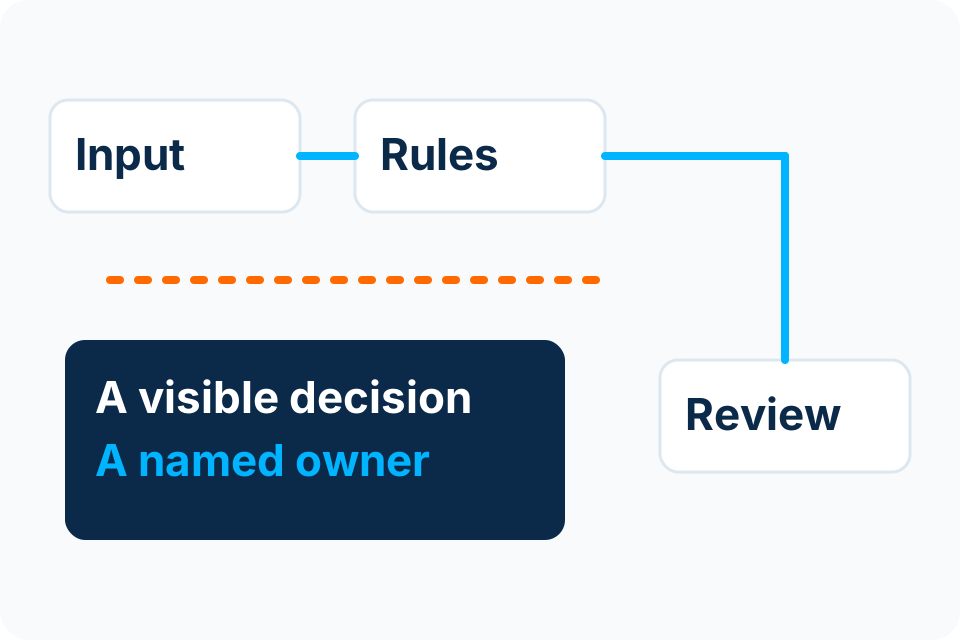
A business process, with visible responsibility.
- Work entersRequest · document · event
- A decision is ownedRules · AI assistance · human review
- The outcome is recordedStatus · exception · next action
Start with the work that keeps getting stuck.
Requests waiting for a decision
A purchase request reaches an inbox, but nobody knows who owns the next step. Map the approval rule, the authorised reviewer and the follow-up before adding another notification.
Explore Workflow AutomationDocuments being retyped
Invoices, forms and supporting records arrive in different formats. A document workflow can help capture information, check required fields and route exceptions to a person.
Explore Document & Invoice AutomationSystems that do not share an outcome
A customer or service request is entered twice and its status diverges. Identify the authoritative record, permitted integration and recovery path before connecting applications.
Choose rules, AI or a person for each decision.
| Situation | Useful starting approach | Control to agree |
|---|---|---|
| The same clear condition always produces the same action | Deterministic rules | Test the rule against normal cases, boundary values and exceptions. |
| Text or documents require interpretation | AI-assisted classification or extraction | Validate against source evidence; send uncertain or consequential outputs for review. |
| A decision commits money, access or a customer promise | An authorised human decision | Record the decision, its reason and the authority to act. |
| The process is inconsistent or has no accountable owner | Process clarification first | Stabilise the work before automating its confusion. |
An AI confidence score is not approval. A useful design separates a suggested result from the action your business is authorised to take. The correct answer may be a small rules-based workflow with no AI at all.
Read AI versus rules-based automationMake the exception path visible.
Illustrative process — agree the actual scope before implementation.
- ReceiveCapture the agreed request and identify its source.
- ValidateCheck required information and detect duplicates.
- RouteAssign the decision to a named role.
- ReviewResolve an exception or authorise the next action.
- RecordUpdate the agreed system and retain a usable history.
For an invoice-review example, a proposed supplier or amount must be checked against the original document and agreed business records. Missing references, duplicate documents and changed bank details should create an exception, not an automatic payment.
Try the labelled invoice-review demonstrationIntegration starts with a source of truth.
What we assess
- Which application owns the record and which only needs a copy.
- Available APIs, supported connectors or approved file exchange.
- Licences, permissions, data formats and provider limits.
- What happens when a connection fails or a message arrives twice.
What your team provides
- A process owner who can explain the real steps.
- A small, authorised set of representative examples.
- The people allowed to approve access and business actions.
- A practical fallback while a connection or workflow is unavailable.
Microsoft 365 and existing business applications can be part of the assessment. A familiar product name does not establish that a particular connector, licence or integration is suitable. Access and compatibility are confirmed against the actual environment before the build.
Sources and further reading
Agree what success will look like.
| Before a pilot | During the pilot | Before wider use |
|---|---|---|
| Measure how the process works today: time, rework, waiting and exception types. | Use a bounded process and representative normal, unusual and failed cases. | Compare actual results with the baseline and the agreed acceptance criteria. |
| Name the owner, approvers, data sources and permitted actions. | Check permissions, escalation, duplicate handling and recovery. | Confirm operating responsibilities, support scope and handover. |
| Separate implementation cost from licences and ongoing operation. | Record changes and reasons so the team can explain the outcome. | Decide to improve, expand or stop based on evidence. |
Measure improvement without inventing returns.
A shorter processing time is useful only if the result is correct and the team can handle exceptions. Compare like-for-like work, include review and maintenance effort, and keep projected savings separate from measured results.
Use the automation pilot acceptance checklist to agree the evidence, and the automation value worksheet to separate released staff capacity from cash savings.
See how the work could change.
These are illustrative workflow patterns. The actual systems, permissions and acceptance criteria need to be agreed for your business.
| Today | Proposed workflow | Keep the decision accountable |
|---|---|---|
| A sales enquiry moves between an inbox, a spreadsheet and reminder messages. | Capture the request, assign an owner, record its stage and prompt a follow-up. | A person decides the offer and customer commitment; duplicate requests are reconciled. |
| An invoice is retyped, checked in another system and forwarded for approval. | Read the required fields, compare the reference and total, then route exceptions to a reviewer. | The reviewer checks source evidence; payment authority remains separate. |
| A new starter is arranged through disconnected messages. | An approved request starts a visible checklist for equipment, access and induction. | Named owners approve access; overdue and cancelled tasks have explicit handling. |
Check the fit with the tools you already use.
| System context | What we need to establish |
|---|---|
| Microsoft 365, email or shared files | Tenant ownership, licensed connectors, permitted data and the account allowed to run the workflow. |
| Accounting, ERP or line-of-business software | Supported API/export access, stable identifiers, read/write authority and the handling of an unavailable service. |
| Spreadsheets and manual registers | Which record is authoritative, who may change it and whether its structure is stable enough to automate. |
| WhatsApp or another external channel | The approved provider connection, consent and messaging rules, ongoing charges and a human continuation path. |
An existing subscription or login does not automatically permit every integration. Discovery establishes the supported route before a build is promised.
Prepare a useful first brief.
- Describe one process, its trigger and the result you want.
- Estimate frequency and typical waiting or rework; a rough baseline is a starting point.
- List the applications, documents and teams involved.
- Identify the exception that causes the most trouble.
- Explain timing, access, privacy or budget constraints without sending sensitive files.
Questions before you automate.
Can you automate a process that still changes every week?
It may be better to clarify the process first. Automate stable parts only where the owner can explain the rules, inputs and failure path. A changing process is not automatically a good AI use case.
Will this replace the applications we already use?
That is a scoping decision. First assess supported connections and the existing source of truth. Replacing a system is a separate business decision, not an assumed requirement of an automation project.
How much does AI automation cost?
Foxbyte scopes automation individually. The number of workflows, integrations, data quality, testing, permissions and ongoing support affect cost. Request an itemised implementation and operating-cost proposal rather than relying on an unrelated starting price.
How long does implementation take?
A schedule follows the agreed scope, access, representative examples, decision-maker availability and testing needs. This page does not promise a fixed delivery period for an unassessed automation project.
Should we send production data for the first conversation?
Begin with a description and non-sensitive examples. Agree authorised access and data handling before sharing real customer, employee or financial records. Never send passwords, OTPs or payment credentials in an initial enquiry.
Bring one process. Leave with a clearer next step.
Tell us where work waits, what systems it crosses and who needs to approve. We will help identify the next useful scoping conversation.
Foxbyte Insights
Prepare for the decision.
AI & Automation
Which business workflows should you automate first?
Start with a repeatable, well-understood process that has an accountable owner, accessible inputs and a recoverable failure path. Frequent frustration is a reason to investigate a workflow, not proof that it is ready to automate.
Foxbyte InsightsPublished Updated
Read the guide: Which business workflows should you automate first?AI & Automation
Where human review belongs in an AI-assisted workflow
Put human review where the consequence and uncertainty require it. A person clicking “approve” is meaningful only if they have the authority, evidence and time to make the decision.
Foxbyte InsightsPublished Updated
Read the guide: Where human review belongs in an AI-assisted workflowAI & Automation
How to write acceptance tests for an automation pilot
Write the acceptance criteria before a pilot begins. The test should show whether the agreed business boundary works, including difficult inputs and interrupted handoffs.
Foxbyte InsightsPublished Updated
Read the guide: How to write acceptance tests for an automation pilot